Archive | Tools RSS feed for this section

TEDMED at Home

17 Apr

My workplace is live streaming the terrific annual event, TEDMED, this week. Many of the talks eventually become available through the TED website, so if you’re not able to watch now, do check in at a later date to see what gets posted. In particular, you might want to watch Larry Smarr describe his hard-to-imagine quest for gathering, tracking, and analyzing every kind of microbe living in his colon. Perhaps it sounds a bit dry, but trust me, it was a fascinating talk.

If you’re interested in mobile health, don’t miss Deborah Estrin’s talk on the work she is doing at Cornell towards an “Open mHealth” movement. Assessing our “social pulse,” she argues, can tell as much about our health as anything, and doing such a thing is becoming more and more possible with the advent of so many tools and apps available for mobile devices. (Visit Small Data to use/see your own small data.)

EVERY academic librarian, along with every single person who utilizes the resources of an academic library, needs to watch Elizabeth Marincola speak on, “What happens when science, money, and freedom of information collide?”  Marincola is a business person and a publisher… and a VERY strong advocate for making published scientific research available to all. “I don’t know anyone who believes that the mission of science is the comodification of data.” GREAT quote!

Max Little spoke of the role of applied mathematics and “prediction competitions” to drive science forward. Amy Abernathy proposes the wonderful idea of Info Data Drives, based on the model of blood drives, where individuals can donate their health data to build the kind of data sets needed to solve complex medical mysteries. Mick Cornett, the mayor of Oklahoma City, talked about how his city redesigned itself for people, as opposed to automobiles, and in doing so went from being on the list of “Most Obese Cities” to “Most Fit Cities” in a matter of a couple of years. Even more, building infrastructure that focuses on community, recreation, and other healthy social activities has made Oklahoma City a destination for many young adults and families, bringing with them the talent and skills needed to keep a city thriving. Sally Okun is the first nurse to grace the TEDMED stage and, not surprisingly to me, she was the one speaker so far who hit home the importance of listening to what patients say. She’s involved in some really interesting contextual language research, trying to develop a lexicon of patient language. I’ve made a note to follow-up on it.

The morning also brought a couple of terrific interludes; Jill Sobule (I loved her already, but now that I know she’s the TEDMED troubadour…) sang a song with fantastic lyrics that I’m afraid I can’t provide here on this family/work-oriented blog. Let’s just say, in the wake of bombs going off at the Boston Marathon, politicians arguing over gun control, and every eye focused on immigration reform, Sobule gives me a nice little refrain to sing over and over again in my head (“When they say, ‘We want our America back’…). Thank you, Jill. And if you’ve never seen Zubin Damania’s alter ego, “ZDoggMD” and his PSAs for different health issues, well you’ve just never seen an internist rapper before, have you? Check him out!

Finally, our very own Myrna Morales, Technology Coordinator for the NN/LM NER, worked with the students organizing today’s streaming to make it possible for a few of us to give our own TED Talks during the breaks! I’m really pleased and honored to work in a library where six people stepped up to the plate and spoke. I captured them on video and after editing (and if I receive permission from the individual speakers), I’ll share their talks on my blog. In the meantime, here is my own and very first TED Talk. Not quite ready for the big leagues, but it was awfully fun to do. Hope you enjoy it!
The $64,000 Question (Odds and Ends)

27 Feb

My week of birthday celebration is behind me now and what a week it was, filled with a party and a holiday and a lecture to a data management class and a professional group board meeting. One is hard-pressed to complain about a full, fulfilling life. Thanks to all of my friends and colleagues near and far who helped me celebrate well.

The full schedule left me with a bunch of notes in my notebooks, things that I don’t have the time to expound upon right now, but I want to offer as “odds and ends,” in case you might find something useful in any/all of them.

First, the word of the week appears to be EMPATHY. It’s come up in two different books that I’m reading; Dan Pink’s, To Sell is Human, and Lee Lefever’s, The Art of Explanation. I recommend both, by the way. Pink’s book offers advice on moving people, getting them to buy what you’re selling – a service, an idea, or an area of expertise. Lefever’s is about… well, it’s pretty self-explanatory … the art of explaining things to people. It’s an art, he argues, and thus something that we can learn to do. For both of the author’s, a significant key to success in these areas is empathy. Being able to put one’s self in the mind and shoes of another helps to get our point across.

It seems a pretty good message for me as I seek to find my place on research teams. The better I understand the people that I’m trying to sell on the idea that they could use an informationist on their team, the better my argument will be. Likewise, the better I can explain what the heck an informationist is in the first place, the better I’ll not appear to them as an alien from the planet Librarius.

I have the opportunity to give a lecture next week to students in our graduate program in Clinical Investigation. It’s a course on Team Science and the faculty member teaching it said to me, “You’re always going on about how it’s important to have an informationist on the team. Come teach my class one day.” It goes without saying that I’m working up my empathetic nature so that I can both explain and sell this group of clinicians and researchers on the idea. Stay tuned for a report of how well I do.

**********

I really enjoyed giving a lecture last week to the students taking the Data Management Planning class in Simmons College’s GSLIS program. It’s a small class and the majority of students are auditing it, as they are already professionals working in the field. We had a great discussion about the skills one needs to find success as an embedded librarian. I’ve posted my slides from the lecture to my Slideshare account. As you might imagine, they are more visual in nature than textual, but you may be able to get something from them.


**********

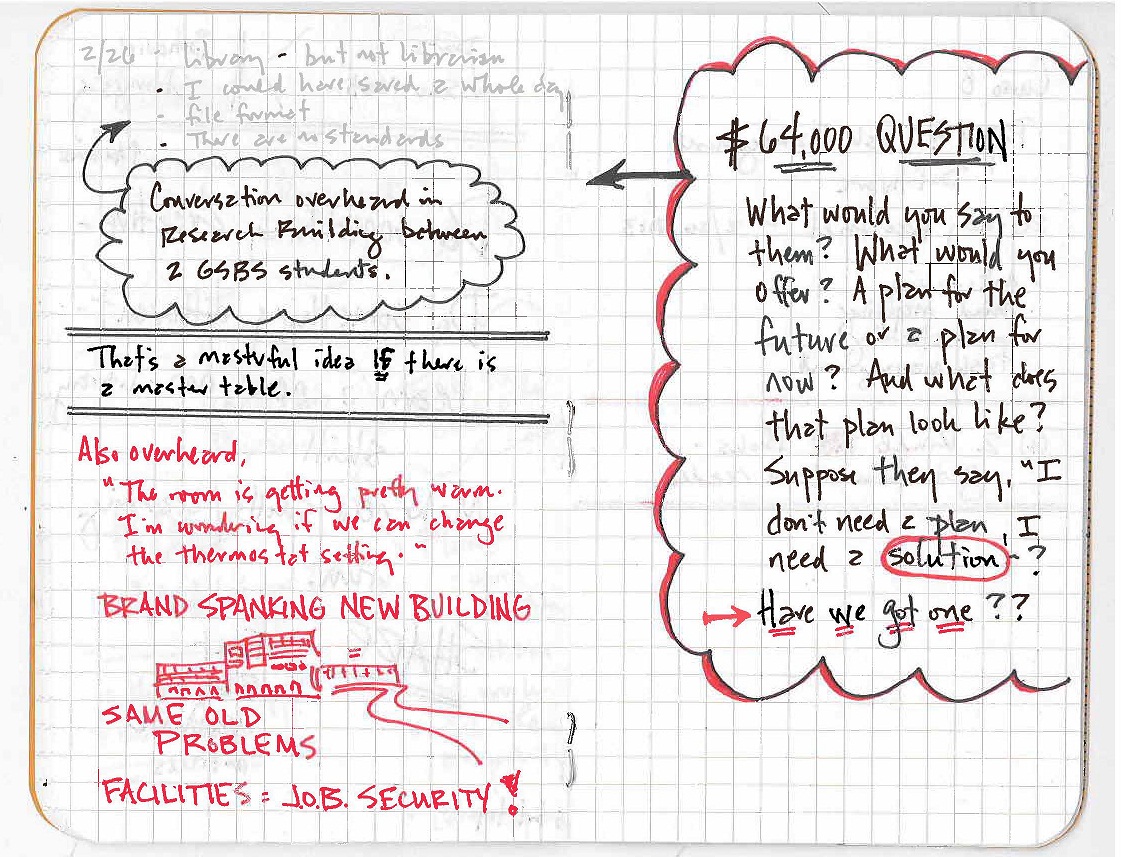
On my embedded days, when I’m not in meetings, I often search out a quiet spot somewhere on campus (not in the Library) where I can work uninterrupted. We have a new research building on campus and during this transition time when people are slowly moving in to the new lab spaces and the cafeteria has yet to open, there are many good places that fit the bill. Yesterday morning I was sitting in what will eventually be a bustling lunch area, preparing for the weekly team meeting, when a few students came and sat at a nearby table. Recalling an assignment that I once had for a writing class, I eavesdropped on their conversation and took a few notes. They looked like this:

Conversation

Ignore the “Also overheard…” bit in red. I just found that really funny and worth a doodle. No matter how new an HVAC system, it seems we just can’t help but complain about the temperature in a room. Must be encoded in our DNA.

No, the part I want you to notice is what I heard the students saying AND the question it prompted me to write. I don’t have an answer for them. Do you? Is a plan the same thing as a solution? If I went up to them and talked to them about creating a plan for managing their data, would this be helpful? I’m not sure and my lack of sureness left me with the question, “Have we got a solution we can offer?” As you note, it could be “masterful,” if we can create it. (By the way, that was a quote from one of the students. Not my word.)

EDITORIAL: A Colleague emailed me after I first posted this, telling me that my notes didn’t make sense. He was right. Here’s a bit of clarification – They said, “I could have saved a whole day of work if there were standards and consistency in file formats.” Then one said, “That’s a masterful idea if there is a master table.” But such a table doesn’t exist and they don’t have time to go back and make one now. Do we have a solution for them that helps them now or can we just make suggestions for the future?

**********

Finally, I’ve been looking for a tool that will help me keep my projects and tasks and ideas and such in order. Now don’t get me wrong, I’m not about to trade in my notebooks. (As a matter of fact, I got a fresh supply of Field Notes journals on Sunday, courtesy of my wonderful spouse.) No, pen and paper and doodling will remain a staple for me, but I need an online tool to help me organize a working schedule and working demands that aren’t quite as routine as they once were. Yesterday, I stumbled across Curio 8 and downloaded the free 25-day trial to my Mac laptop. In a word, “Whoa!!”  It’s pretty rare nowadays to find something that you can figure out how to use in about 10 minutes. It’s not a high-powered project management tool, but that’s probably to its advantage for me right now. I don’t need a lot of bells and whistles, but rather something that I can put into use quickly and easily. I have a feeling this is it. Is anyone out there using it? If so, I’d love to hear your feedback before I decide on purchasing. It’s not overly expensive ($100), but I like hearing from others before putting my money down.

That’s it for this week’s check-in. Oh! Except to say that I realized this morning that you can enlarge the font size on an iPad to make reading an ebook on it easier. Is this a new feature? Nah… but my 50 year old eyes are!

He Said, She Said (and who can possibly remember?)

13 Feb

One of the tasks I have as an informationist on the study team is to help improve communication. In fact, it’s Aim #1 in the proposal we wrote to the National Library of Medicine for the grant: “Develop tools to improve data specification and communication.” For most of the past month or so, I’ve been working on a data request form. Back and forth and back and forth we go with iterations of it. Last week, it finally went through a test-drive as one of the principal investigators used it to request several analyses from our analyst. (Isn’t it convenient for an analyst that s/he does analyses? So clear. An analyst analyzes. A librarian… librarianizes? We should be so lucky.)   It’s back in my hands now to make a few more tweaks based upon her feedback, but it’s coming along nicely. Hopefully, it will become a well-used tool in the future, making the communication of statistical analyses between requester and analyst  more efficient.

As I sat in on yesterday’s meeting, I heard in the conversation another area where a tool would help improve communication between team members. Much of the history of this study can be found in email correspondence. Often, someone will say something like, “I remember that we changed such and such to so and so back in 2010,” and the indication is that somewhere in the virtual mound of emails of 2010, there exists documentation of this change. Everyone remembers the email, the discussions during team meetings, the outcome, etc. but the details are sometimes lacking. When it comes to writing articles, however, a lot of these details become very important pieces of information needed to describe exactly what happened and when. I began to wonder if we had a searchable archive of all of the email involved in the study, would it be a useful tool for the team. I posed the question later in the afternoon (via an email, of course!) and heard back from several people that they agreed.

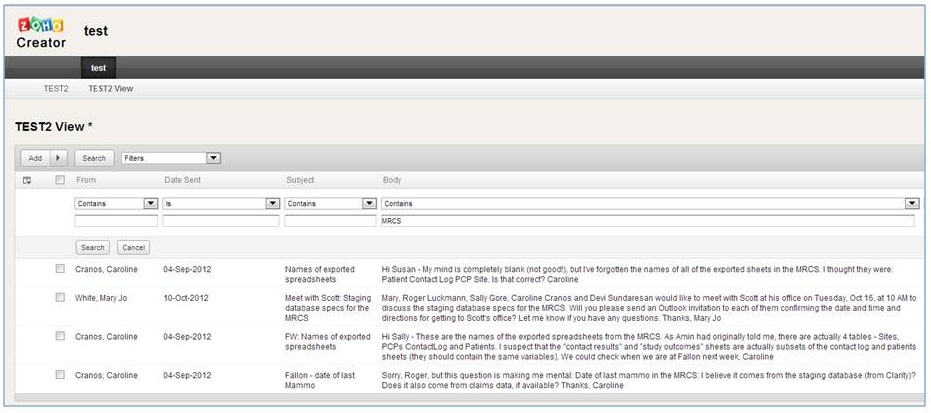
To figure out how to accomplish this task, I began searching for things like communication log software, email exporters, and tools for Outlook. I also revisited Zoho Creator to see how and if it could work to create a database for these things. Basically, my thinking was to export pertinent fields like date, sender, and body of the email; index them (using tags); and make them searchable. Then, if someone was curious about the development of the phone counseling system, s/he could do a search for “MCRS” in all of the emails and receive a nice, chronological report of everything communicated about the process during the software development. “This is good!” I thought.

Screen Capture of search results.

Screen Capture of search results. A mini test.

I set to work downloading the add-on tool for Outlook that I decided on, Code Two Outlook Export. It was pretty straightforward, no hiccups or frustrations. Then I practiced exporting the “Informationist” folder in my email inbox. The export gave me a csv file that I then opened in Excel. I didn’t get exactly what I wanted, so I tried a few other export field options until it looked right. At this point though, I could tell there will be a good bit of cleanup to do in the Excel file. We have a lot of stuff in the body of emails – stuff that runs all together in an Excel cell. I decided to delete content in the body of the emails that was irrelevant and/or redundant. This helped a lot. Once I had the spreadsheet the way I wanted it, I then uploaded it into a new application in Zoho Creator, did some more tweaking here and there, and eventually got something that worked!

Admit it. It’s always a rush when you create something, isn’t it? 

I sent some screen shots to the team members and asked for feedback. Already I’ve heard from several who think it’s a great idea! It will take some doing to collect and cleanup several years of emails related to the study from everyone involved, but I think it will be a real help. Also, the system will be in place for future studies. As a matter of fact, I already have laid out in my mind how I can use this with the new CER group that I’m going to be embedded in soon. As their email list is fairly new, it will be a much easier start-up.

If you decide to try either of these tools – or if you’ve instituted a similar email archive to help with communication within a group – I hope you’ll share your experience in the comments section here. It will be great to hear what works for others.